

TL;DR
Email design is all about strategic clarity that drives subscribers to take action. Through years of helping eCommerce brands attribute 30-40% of their gross revenue to email, we’ve learned that effective design combines purposeful layouts, mobile-first thinking, and brand consistency that goes way beyond style guides. The difference between emails that impress and emails that sell comes down to intentional details like proper contrast, dark mode testing, strategic GIF usage, and ensuring every visual element earns its place by driving measurable results.
Key Points
• Strategic design uses clear visual hierarchy and purposeful spacing to guide subscribers directly toward conversion actions.
• True email branding studies how your brand appears across stores, packaging, and social media to create authentic recognition beyond logos and colors.
• GIFs should demonstrate product functionality or create anticipation, never serving as decoration that slows load times and distracts from goals.
• Dark mode preparation requires white outlines on text images and contrast testing to prevent unreadable designs that kill conversions.
• Mobile-first design demands larger fonts, generous button padding, and separate layouts since 70% of email opens happen on phones.
At Forge Digital Marketing, we’ve helped dozens of established eCommerce and DTC brands transform their email marketing from underperforming afterthought into consistent top revenue drivers — with most attributing 30–40+% of their gross revenue to email marketing within just a few months of working with us.
Through years of testing and refining, we’ve learned that what makes email design truly work is a mix of clarity, consistency, and purpose — all built around driving measurable results.
This article distills the lessons we’ve applied across high-performing campaigns to show you how thoughtful, strategic design not only elevates your brand but directly impacts sales.
01 🟡 From Concept to Conversion: How Design Shapes Results
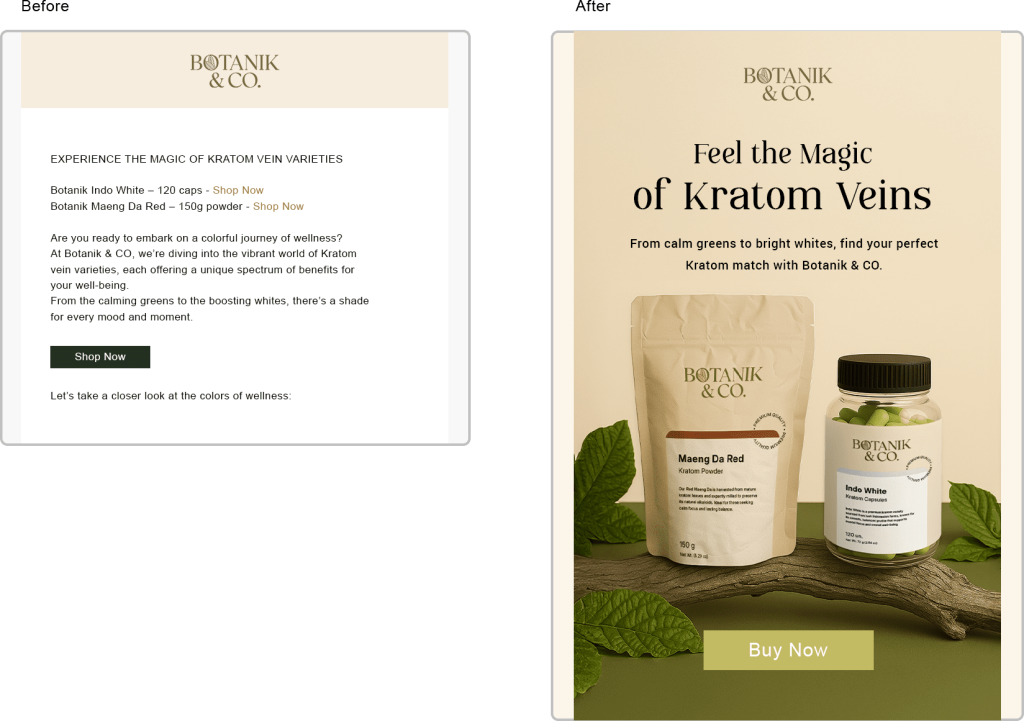
Weak design costs clicks. Small fonts, poor contrast, and over-designed layouts confuse the eye and distract from the goal. The result? Emails that may look impressive, but fail to convert.
A well-planned layout organizes content, reinforces a brand’s unique value proposition, and guides readers toward the action you want — whether that’s completing an abandoned purchase, becoming a monthly subscriber or engaging with your brand’s upcoming sale. It needs to be clear, direct, and intentional.
The difference between an email that’s just “nice to look at” and one that actually drives sales is in the details: strategic spacing, a clear visual hierarchy, and purposeful visual elements. Nothing is there “just because.”
02 🟢 Branding Beyond the Style Guide: Building Emails that Feel On-Brand
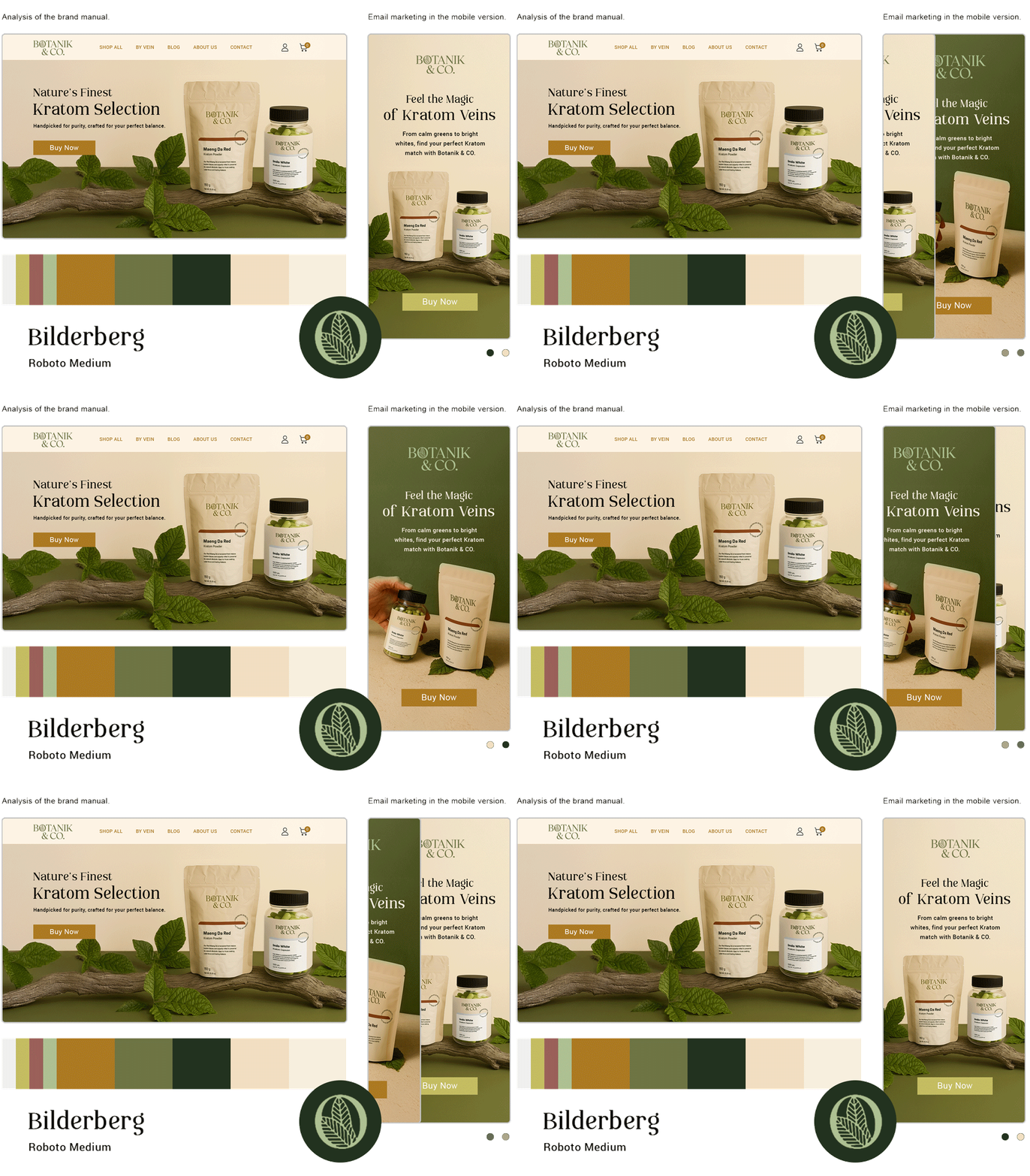
True branding in email goes beyond dropping in logo, colors, and fonts. It’s about understanding how your brand lives in the customer’s mind — on your website, in your store, on social media, and in everyday interactions.
Effective design research looks beyond brand guidelines. We embody the design of your store (online and physical), the dominant colors in product displays, the packaging style, and even consider how customers post your products on Instagram and TikTok. For example, seeing a customer hold your product gives a true sense of scale — helping you design more accurate and authentic images in your emails.
A great marketing email doesn’t just match brand guidelines — it blends seamlessly into your brand’s world, building instant recognition and trust.
We also use emerging tools like Panoramata that allow us to track not only our emails we create for our clients, but their competitors as well. This allows us to create benchmarks that directly compare both design and deliverability side by side with our client’s brands against competitors!
03 Strategic Use of GIFs in Email Marketing
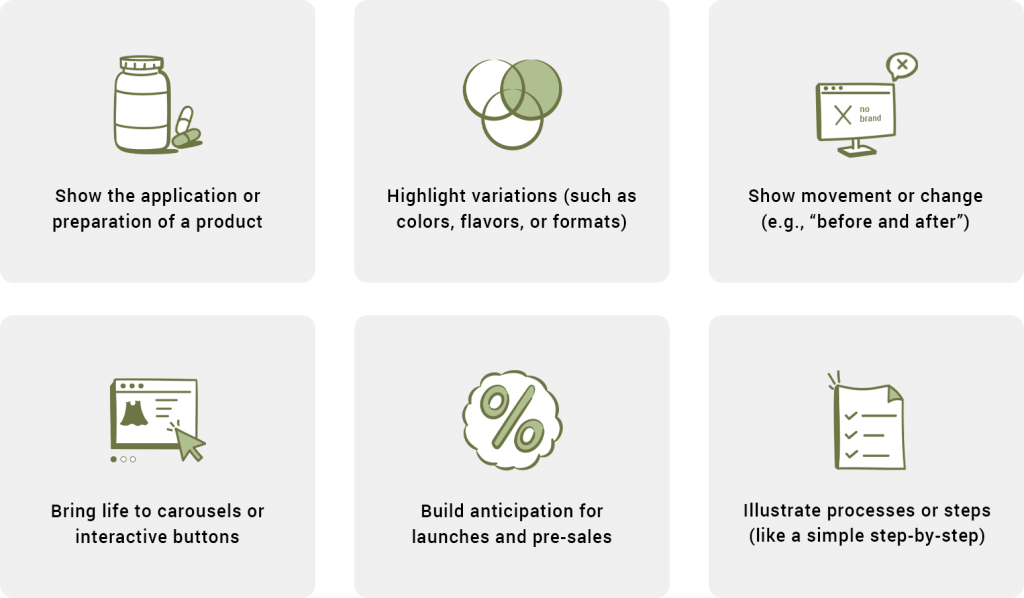
GIFs can be powerful, but only when they have a strategic purpose. For example, they’re great for:
- Showing how a product works or is prepared
- Highlighting variations (like colors, flavors, or sizes)
- Showing movement or transformation (e.g., “before and after”)
- Adding life to carousels or interactive buttons
- Creating anticipation for a launch or pre-sale
- Explaining a quick step-by-step process
Think of a GIF as a communication tool, not a decoration. They should support your message, not compete with it.
The best GIF usage is light, intentional, and focused. Done right, they enhance your message and improve user experience. Overused or poorly placed, they can slow down load times (leading to click outs and deletions) and distract from the email’s primary objectives.
04 ⚫ Dark Mode: The Designer’s New Reality
More and more subscribers read emails in dark mode and on mobile — and it can completely change how your design looks (typically for the worse, unless you specifically understand how to design for dark). A perfectly balanced light-mode email can become unreadable in dark mode.
The biggest challenge? Images with text. If titles or CTAs are embedded without outlines or neutral backgrounds, they can disappear entirely. For example, black text on a transparent PNG might look fine in light but vanish in dark mode.
And be aware of images that rely on the email background color — some email platforms automatically invert colors, which can break your design.
Best practices:
- Add white outlines or light shadows to text in PNG images
- Test your design in both light and dark mode before sending
- Ensure enough contrast for all visual elements
Good design works anywhere — no matter the subscriber’s screen setting.
 | Email in normal mode – looking just as designed.
|
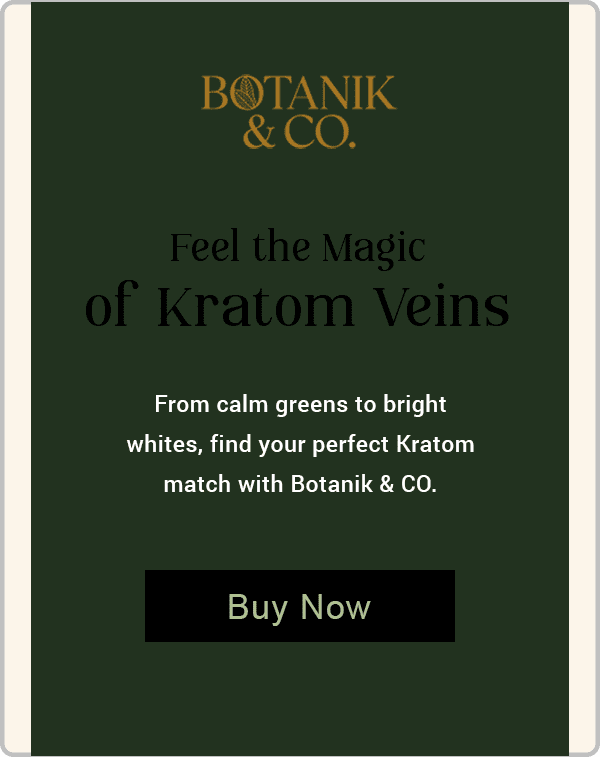 | Dark mode – broken layout due to lack of preparation.
|
 |
|
05 📱 Mobile-First Email Design
Over 70% of email opens in the U.S. happen on mobile devices. If your design isn’t mobile-friendly, you’re losing conversions before the first click.
One of the biggest mistakes is using the same design for desktop and mobile. What looks great on a large screen can turn into tiny, unreadable text and hard-to-tap buttons on a phone.
Responsive design isn’t just about shrinking things down — it’s about reorganizing content to make it easier to read and act on.
Practical tips:
- Use body text larger than 16px and headings at least 20px
- Give buttons at least 10px of padding
- Keep coupon codes and key offers as editable text (easier for copy-paste)
- Test on multiple devices — iPhone, Android, tablet, laptop
- Consider separate banner versions for desktop and mobile
💡 Extra tip: Export your button from the email builder and adjust it in Photoshop to ensure it stays sharp and legible.
06 ✅ The Pre-Send Visual Checklist
Before hitting “send,” review your design with a critical eye. Even a small oversight can undermine your message or credibility.
A good checklist ensures your email is readable, on-brand, and optimized for every screen.
Before you send, check:
- Typography: Is it legible and well-spaced?
- Buttons: Are they visible, clickable, and action-oriented?
- Images: Are they sharp, fast-loading, and relevant?
- Hierarchy: Is the most important element getting the spotlight?
- Responsiveness: Does it work across devices?
- Legibility: Is it readable across light and dark modes?
- Consistency: Is every element aligned with your brand identity?
Ready to Turn Your Emails Into a Top Revenue Channel?
If your emails look great but aren’t producing results, you might be missing the design strategies that turn clicks into conversions. At Forge Digital Marketing, we’ve helped dozens of brands go from low engagement to generating 30–40% of their gross revenue from email alone — often in just a couple of months.
Let’s talk about how we can do the same for you. Get in touch here!

By Layze Santos
Layze Santos is a Graphic Design Strategist at Forge Digital Marketing, with a long and dynamic journey in email design, UI/UX, video editing, animations, illustrations, and branding. She enjoys creating visuals that capture attention and convey ideas in a unique way.