
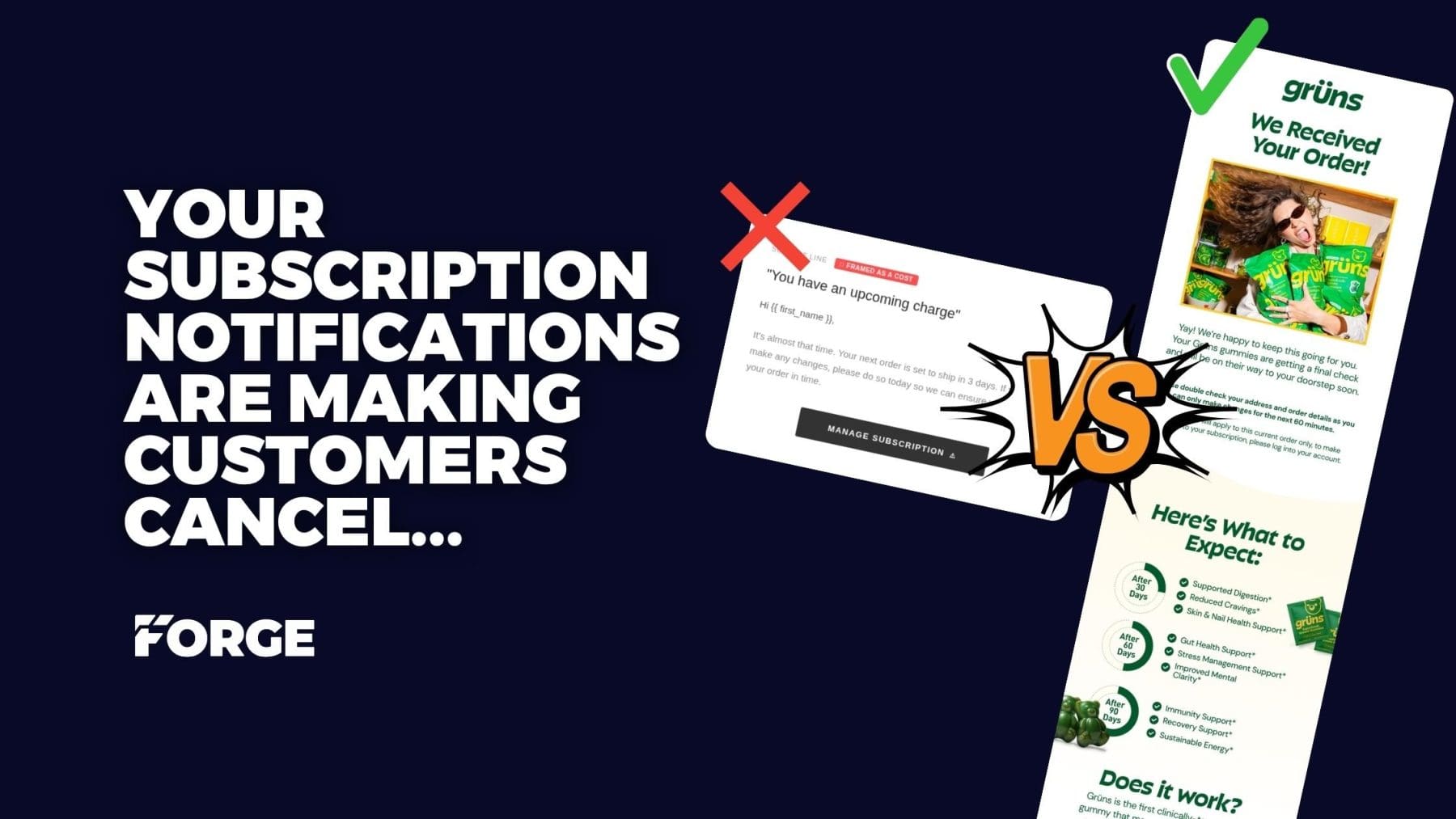
Your upcoming charge notification gets 60%+ open rates. Most DTC brands waste it by literally inviting cancellations. Here’s how to turn it into your highest-converting retention touchpoint… and actually grow AOV in the process.
TL;DR
If you run a DTC subscription brand and your “upcoming charge” email still says something like “It’s almost that time… manage your subscription below”… you’re basically handing your subscribers a cancel button on a silver platter.
The fix: Reframe the entire email from a billing warning into a value-reinforcing, upsell-driving retention moment. Lead with excitement about their next order, stack subscriber benefits, offer one-click delay/skip buttons before any manage link, add product recommendations, and push “Manage Subscription” to the very bottom.
Brands doing this are seeing up to 50% less churn at this touchpoint and meaningful AOV lifts from in-email upsells. One beverage brand cut their Month 2 churn from 60% to 30% just by rethinking this single email (Stay AI case study).
This is the highest-ROI email template change you’ll make all year. And it takes an afternoon.
Table of Contents
- What Is the Upcoming Charge Email?
- The Problem: Why Most Brands Get This Wrong
- Real-World Examples: Bad, Better, Best
- The Data: How Much This Actually Costs You
- The Fix: 6-Step Email Redesign Framework
- The Full Template Structure (Copy This)
- What to Measure After You Deploy
- Tools That Make This Possible
- FAQ
What Is the Upcoming Charge Email (And Why Does It Matter)?
The upcoming charge email (also called a pre-shipment notification, upcoming order reminder, or subscription charge notification) is the transactional email sent to subscribers before their next recurring order is billed and shipped. Most subscription platforms (like Recharge, Stay AI, Loop, Bold, Skio) send this automatically, typically 3-5 days before the charge date.
Here’s why this email is so important and why most brands completely sleep on it:
It has the highest open rate of any email you’ll ever send. We’re talking 60%+ open rates consistently (ARPU). That’s 3-4x what your best promo email does (unless you work with Forge 😝).
My point is, every subscriber reads this thing. Every. Single. One.
And yet… the default template on basically every subscription platform looks something like this:
Subject: You have an upcoming charge
It’s almost that time. Your next order is set to ship in 3 days. If you’d like to make any changes, please do so today so we can ensure we can update your order in time.
[MANAGE SUBSCRIPTION]

The default template. Subject: “You have an upcoming charge.” Body: “If you’d like to make changes…” CTA: One giant MANAGE SUBSCRIPTION button. This is the template that’s quietly bleeding your LTV every single month.
If you just read that and thought “…wait, that’s basically what ours says”… yeah. You’re not alone. And that’s a problem.
The Problem: Most Brands Are Using Their Highest-Engagement Email to Lose Money 😅
Let’s break down what that default template is actually doing to your subscribers’ psychology:
The subject line: “You have an upcoming charge” — frames the subscription as a cost. Not a value. Not a routine. A charge. You’re literally starting the conversation by reminding them money is leaving their bank account.
The body copy: “If you’d like to make any changes…” — that’s a polite way of saying “hey, want to cancel?” You’re planting the seed of doubt in a subscriber who probably wasn’t even thinking about canceling until they opened this email.
The CTA: one giant MANAGE SUBSCRIPTION button — leads directly to a portal where… what’s the most prominent option? Yep. Cancel.
So let me get this straight…
You spent real money acquiring this subscriber. You got them through a welcome flow. They made it past their first order. They’re actively paying you every month. And now, at your moment of maximum guaranteed attention, you’re essentially saying:
“Hey! Just a reminder we’re about to take your money. Want to cancel? Here’s the button!”
…that’s what we’re doing? That’s the strategy?!
“Getting Warmer” – What a Partial Fix Looks Like:
Here’s an example from Lume (a DTC deodorant brand) that shows a brand starting to get it right, but not quite there yet:
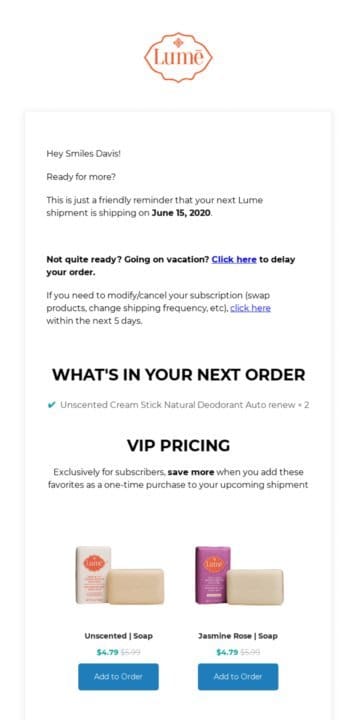
Lume’s upcoming order email. Green flags: they include what’s shipping, and there’s a product upsell section with “Add to Order” buttons. Yellow flags: the delay option is buried in a paragraph (“Not quite ready? Going on vacation? Click here…”), the greeting still leads with the shipment reminder, and there’s no prominent skip/delay button architecture. Better than default. But not optimized.
What Lume got right: they show the order contents, they have an upsell section, and they offer a delay. But the delay is buried in paragraph text instead of a one-click button which means subscribers who “aren’t ready yet” still have to hunt for it… and many will just cancel instead.
The fix is being intentional about the hierarchy. Every friction-reducing option (delay, skip) should be more visible than the cancellation path. Lume’s almost there… but almost doesn’t save the churn.
The Gold Standard: What Grüns Gets Soooo Right 🙂↕️
Okay so I have to talk about Grüns here because I actually received this email as a subscriber and it stopped me mid-scroll.
This is what we’re aiming for.

Click to expand ^ Grüns’ upcoming order notification. Subject: “We’re preparing your order 📦”. Every single element is doing psychological work and none of it feels like a billing warning.
Let’s break down exactly what they’re doing…
The subject line: “We’re preparing your order 📦”
No “charge.” No “billing.” No “upcoming.”
They’re preparing something for you.
The mental frame is completely flipped. This isn’t money leaving your account, it’s a package being built. That’s not an accident. That’s intentional psychology.
“Yay! We’re happy to keep this going for you.”
Two words: “keep this going.” Not “you’ve been charged.” Not “another order is processing.”
They’re positioning the brand as a partner in maintaining your routine, not as a company extracting payment.
The word “Yay!” is doing emotional priming before the subscriber even reads a word of substance. By the time you get to the details, you’re already in a positive headspace. That’s Kahneman 101: the framing of the first moment colors everything that follows.
The 60-minute urgency window: “You can only make changes for the next 60 minutes.”
This is sneaky-brilliant. Most brands either give no window (subscribers feel powerless) or a vague “manage your subscription” nudge (subscribers wander off to cancel).
Grüns gives a bounded, specific, low-stakes action: just check your address. That’s it. It’s almost impossible to say no to… and that small act of engagement is a micro-commitment that re-anchors the subscriber to the order they already said yes to.
The 30/60/90-day outcome ladder
This is the move most brands completely miss. They re-sell the why inside the order notification itself:
- After 30 days: Supported Digestion, Reduced Cravings, Skin & Nail Health
- After 60 days: Gut Health, Stress Management, Mental Clarity
- After 90 days: Immunity, Recovery, Sustainable Energy
By month 3, your subscriber has probably forgotten why they started. Subscription fatigue is real: people cancel not because they hate the product but because they’ve stopped connecting it to a goal. Grüns re-connects that goal every single month, at the moment of highest attention. That’s your cancellation defense.
The clinical data
“20.5% increase in Folate. 40.1% increase in Vitamin C.”
Right there, inline, with a bar chart. They’re not just saying “our gummies are good for you”, they’re proving it, in the email, at the exact moment when churn risk is highest. This re-justifies the purchase decision just before the card gets charged.
“4.8 Stars | 1,000,000+ Members”
The closing line before the footer is pure social proof. A subscriber who’s wavering suddenly remembers: one million other people are doing this. That’s community.
That’s validation.
The anxiety of “am I wasting my money?” dissolves when you’re reminded you’re part of the largest club that ever said yes to this brand.
What you should take inspiration from Grüns on:
Every element reframes the email from a billing event into a reinvestment in yourself. They never once say the word “charge.” They lead with excitement, empower their customer through a time-bounded action, re-sell the product benefits to people who already bought, and close with social proof that makes staying feel like the obvious, validated choice.
Side-by-Side Psychology Summary
| Element | “You’re About to Be Charged” | Grüns’ Approach |
|---|---|---|
| Core frame | Loss (money leaving) | Gain (product arriving) |
| Emotional tone | Neutral / transactional | Enthusiastic / celebratory |
| Customer role | Passive recipient of charge | Active agent in their health journey |
| Urgency | None or anxiety-inducing | Empowering (you have 60 min to act) |
| Churn defense | None | Full benefits re-sell + social proof |
| Brand relationship | Vendor collecting payment | Partner invested in your outcomes |
That’s the bar. That’s what your upcoming charge email should be doing.
The Data: How Much This Email Is Actually Costing You
Okay let’s talk numbers because this isn’t just vibes, the data here is wild!!
Subscription Churn Is Already Brutal
Average monthly churn for DTC subscription brands sits between 10-15% (Recurly).
That means if you sign up 1,000 subscribers in January, roughly half are gone by summer.
The subscription economy is fundamentally a retention game, and only about 20% of subscription businesses are actually improving their retention numbers (yikes).
The LTV Math
If your average subscription order is $80 and your customer sticks around for an average of 6 orders before churning, each subscriber is worth $480 in lifetime value. Every cancellation at this email touchpoint is $480+ walking out the door… and you held the door open.
The Upsell Opportunity You’re Missing
Here’s where it gets really painful…
- Cross-sells and upsells account for over 30% of ecommerce revenue (Shopify)
- For subscription businesses specifically, up to 46% of revenue comes from upgrades and add-ons
- Upselling converts at roughly 20% on average — way higher than cold acquisition
The upcoming charge email is one of the most effective touchpoints for driving those add-ons… because the customer is already expecting to buy.
The purchase decision is made. The credit card is on file. You’re just asking “want anything else while we’re packing? 👀”
And most brands aren’t even asking!
The Fix: How to Redesign Your Upcoming Charge Email for Retention + Revenue
The fix isn’t complicated. Honestly it’s more of a framing shift than a technical overhaul.
But the impact? Massive.
Instead of treating this email as a compliance notification, treat it as what it actually is: your subscriber’s monthly moment of highest engagement with your brand. A moment where they’re paying attention, expecting to hear from you, and already committed to purchasing.
Here’s the 6-step framework:
Step 1: Lead With Identity, Not Transaction
Kill the “upcoming charge” language. All of it. Your subject line should reinforce the subscriber’s identity as someone who made a good decision, not remind them of a cost.
| Before | After | |
|---|---|---|
| Subject | You have an upcoming charge | Your [Brand] order ships soon |
| Preview | (empty or generic) | Here’s what’s headed your way. |
See the difference? One says “we’re taking your money.” The other says “good things are coming.” Same email, completely different emotional response!
Step 2: Open With Habit Reinforcement
Your first line of body copy should make the subscriber feel smart for subscribing, not anxious about a charge.
Before: “It’s almost that time.”
After: “Heads up, your next order ships in 3 days. You’re staying consistent. That’s the whole game.”
One sentence. No fluff. But it reframes everything from “we’re taking your money” to “you’re doing the right thing.” That’s identity reinforcement, and it’s one of the most powerful psychological tools in retention marketing.
Step 3: Stack the Subscriber Benefits (Every. Single. Time.)
Here’s something brands forget… your subscribers forget why they subscribed.
Seriously. By month 3, most subscribers couldn’t tell you what perks they’re getting. So remind them in every single upcoming charge email:
- ✓ Member-only savings on every order
- ✓ Priority access to new products and limited drops
- ✓ Flexible schedule — adjust, skip, or delay anytime
- ✓ Cancel anytime if it’s ever truly not for you
Notice the structure? Three positive benefits… then a soft reassurance that they have control.
That last bullet actually reduces churn because it removes the anxiety that drives impulsive cancellations. When people feel trapped, they cancel. When they feel in control, they stay.
Step 4: Offer Delay and Skip Before Cancel
This is the single most important architectural change in the entire email.
Most brands put a “Manage Subscription” button front and center. That button leads to a portal where cancellation is the most prominent option. You’re sending people who weren’t thinking about canceling to a page that asks them to cancel.
Instead… offer one-click delay and skip options directly in the email:
[DELAY 1 WEEK] · [DELAY 2 WEEKS] · [SKIP THIS ONE]
When a subscriber thinks “I still have product, I don’t need more yet”- the answer isn’t cancellation. It’s a delay. A delayed subscriber is still a subscriber. A canceled one is gone forever.
Tools like Stay AI and ARPU make this possible with two-click delay and skip actions.
The “Manage Subscription” link? It should still exist. But push it to the verrrry bottom of the email, styled as a quiet text link. Not a primary CTA. Not a button. A footnote.
Step 5: Upsell While You’re Packing
This is where the email stops just saving you money… and starts making you money.
Add a product recommendation section with a simple prompt:
“Want to throw something else in while we’re packing?”
This works because the purchase decision is already made. You’re not asking them to buy, you’re asking if they want to add something to an order that’s already happening. The friction is almost zero.
Show 2-3 complementary products with one-click “Add to My Order” buttons. Even a 5-10% add-on rate compounds massively over the lifetime of a subscriber.
Erin’s bonus tip: tie loyalty points redemption in here for mega customer happiness XP.
Step 6: Make Support Effortless
Close with a simple, human line:
Questions? Just reply. We’re here.
That’s it. No ticket systems. No “visit our help center.” Just… reply. This builds trust and it gives subscribers who are on the fence an alternative to canceling. They can talk to a human first.
What It Looks Like in Practice
Here’s a before/after from an actual client redesign — a men’s grooming subscription brand — using this exact framework:
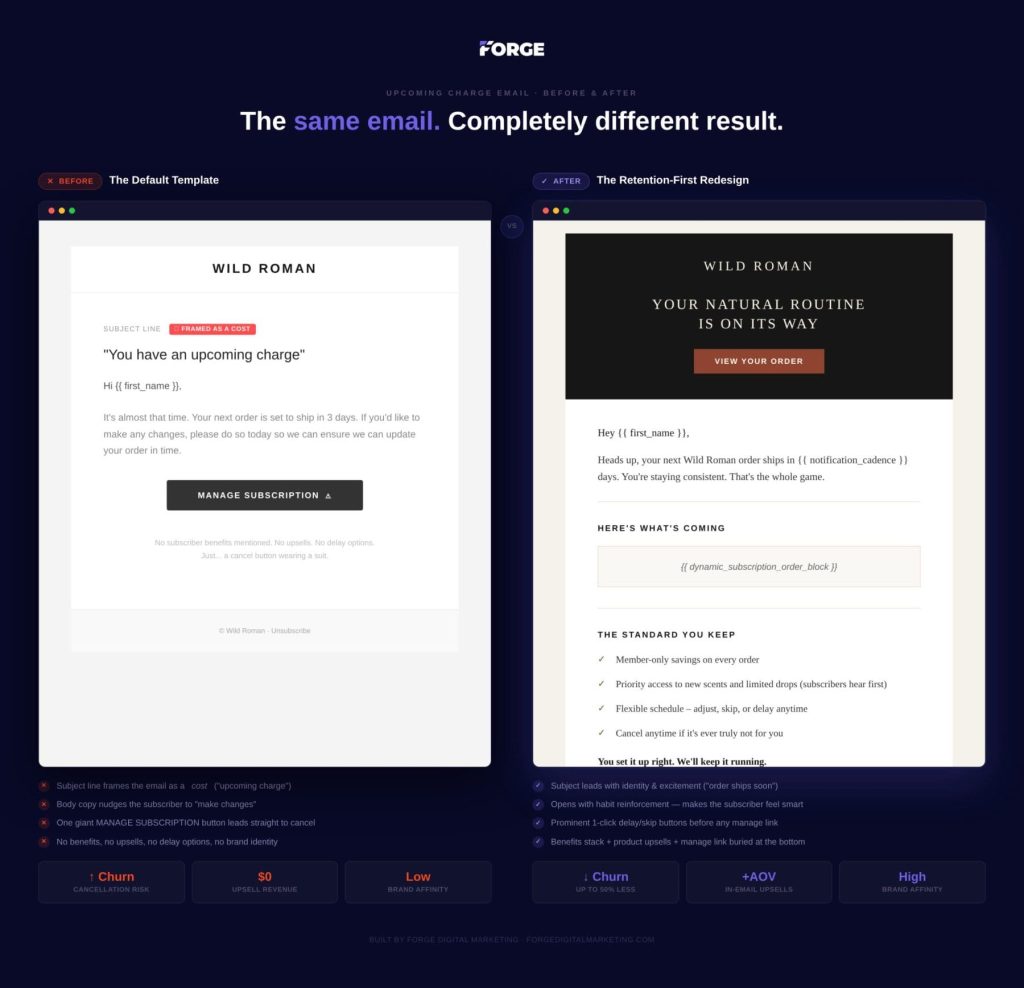 The manage link is still there – it just doesn’t run the show anymore.
The Full Anti-Churn Email Template Cheat Sheet
Here’s the complete architecture… feel free to screenshot this, steal it, send it to your email team. This is the template structure we use for our subscription clients:
| Section | Purpose | Key Detail |
|---|---|---|
| 1. Hero header | Brand-forward, identity-reinforcing | “Your Natural Routine Is On Its Way” — NOT “upcoming charge” |
| 2. Personal greeting | Name + ship date + habit reinforcement | “You’re staying consistent. That’s the whole game.” |
| 3. Order summary | Dynamic block showing what’s shipping | Product images, names, quantities |
| 4. Benefits stack | Remind them why subscribing is smart | 3-4 perks + “cancel anytime” reassurance |
| 5. Delay/skip buttons | Prevent cancellation with easier options | One-click: Delay 1 Week · Delay 2 Weeks · Skip |
| 6. Product recs | Increase AOV with low-friction upsell | “Add to My Order” on 2-3 products |
| 7. Manage link | For people who genuinely need it | Quiet text link at the very bottom |
| 8. Questions | Human touch, churn safety net | “Just reply. We’re here.” |
The key insight: Every section above the manage link does one of two things — makes the subscriber feel good about their subscription, or increases the value of their next order. The manage link exists for people who genuinely need it… but it’s no longer the star of the show.
What to Measure After You Deploy This
Don’t just ship it and forget it. Here are the 4 metrics that tell you if it’s working:
| Metric | What to Look For | Why It Matters |
|---|---|---|
| Churn rate at pre-shipment touchpoint | Voluntary cancellations should drop within 1-2 billing cycles | Primary KPI — this is the whole point |
| Delay/skip rate vs. cancel rate | Subscribers choosing delay over cancel | A delayed subscriber is still a subscriber |
| Subscription AOV | Add-on rate from product rec block | Even 5-10% compounds massively over LTV |
| Subscriber LTV | More months retained × higher AOV per order | The exponential downstream payoff |
Best Tools for Subscription Email Optimization
Here are the platforms that make one-click delay, skip, and in-email upsells possible for Shopify subscription brands:
| Tool | What It Does | Key Feature |
|---|---|---|
| Stay AI | Shopify subscription platform | RetentionEngine + one-click delay/skip in emails |
| ARPU | Upcoming shipment email optimization | Two-click upsells + delay/skip directly in email |
| Recharge | Shopify subscription platform | Customizable notification emails + Klaviyo integration |
| Loop | Shopify subscription platform | Flexible subscriber portal + email notifications |
FAQ
What is an upcoming charge email?
An upcoming charge email (also called a pre-shipment notification or subscription order reminder) is a transactional email sent to subscribers 3-5 days before their next recurring order is billed and shipped. It’s typically sent automatically by subscription platforms like Recharge, Stay AI, or Loop. This email consistently achieves 60%+ open rates, making it the highest-engagement email touchpoint in a subscriber’s lifecycle.
How do I reduce subscription churn with email?
The most effective way to reduce subscription churn with email is to redesign your upcoming charge notification from a billing warning into a value-reinforcing retention touchpoint. This means replacing “you have an upcoming charge” framing with excitement about the next order, stacking subscriber benefits, offering one-click delay and skip buttons before any manage/cancel link, and adding low-friction product recommendations. Brands implementing this approach have seen churn reductions of 30-50% at this touchpoint.
Should I include a cancel button in my upcoming charge email?
No, you should not make cancellation the primary action in your upcoming charge email. Instead, offer delay and skip options first (Delay 1 Week, Delay 2 Weeks, Skip This Order) which keep the subscriber active. A “Manage Subscription” text link should still exist at the bottom of the email for subscribers who genuinely need it, but it should be styled as a quiet footnote, not a primary CTA.
What is a good churn rate for DTC subscriptions?
Average monthly churn for DTC subscription brands is 10-15% according to industry benchmarks from Recurly and Recharge. Top-performing subscription programs target under 8% monthly churn. Voluntary churn (customer-initiated cancellations) accounts for the majority of losses, which is why optimizing high-engagement touchpoints like the upcoming charge email has outsized impact on retention.
How can I increase AOV on subscription orders?
The upcoming charge email is one of the most effective channels for increasing subscription AOV because the purchase decision is already made. Adding a “Want to add something to your order?” product recommendation block with one-click “Add to My Order” buttons directly in the email creates a nearly frictionless upsell moment. Cross-sells and upsells account for over 30% of ecommerce revenue and convert at roughly 20% on average which is significantly higher than cold acquisition.
What open rate should I expect from subscription notification emails?
Subscription upcoming charge emails and pre-shipment notifications consistently achieve 60%+ open rates: approximately 3-4x higher than promotional marketing emails. This is because subscribers are expecting the email (it contains information about an upcoming charge to their payment method) and the content is directly relevant to them. This makes it the single highest-attention email touchpoint in your subscriber’s lifecycle.
The Bottom Line
Your upcoming charge email is not a legal obligation. It’s not a courtesy notice. It’s the single highest-attention moment in your subscriber’s monthly lifecycle with your brand and you get it for free, every month, for the life of the subscription.
Stop using it to remind people they’re being charged. Start using it to remind them why they subscribed.
The brands that figure this out? They don’t just reduce churn. They turn a cost center into a revenue channel.
…and honestly? It takes an afternoon to fix. So if your upcoming charge email still says “You have an upcoming charge”… what are we doing here? Let’s fix that.
At Forge Digital Marketing, we build retention-first email and lifecycle systems for DTC subscription brands. If your subscription emails are leaking revenue, let’s talk.