Your address will show here +12 34 56 78
eCommerce, Marketing, Meta Ads

Author: Erin Schnittker Siemek, Founder & CEO, Forge Digital Marketing

Last updated: October 2026

The short answer: Keep Meta ads in-house if your problem is execution and your spend can fund both a full-time buyer and a steady supply of new creative. Hire an agency if the problem is creative strategy, tracking or compliance, or if your spend can’t yet justify a dedicated team. Figure out which problem you have before you hire anyone.

Most founders start by comparing salaries to retainers. Start with the account. Tired creative and broken tracking produce the exact same falling ROAS, yet each needs a different person to fix it. If you hire the wrong kind of help… you’ll pay for three or four months before anyone notices the real issue.

Assess your current performance and internal capacity

Two questions decide this: what is actually broken, and does your team have the hours and skills to fix it? Answer the first one before you touch the second. A lot of “we need an agency” moments turn out to be a creative problem or a tracking problem wearing a disguise.

Read the funnel in order

Meta performance breaks at a specific stage. Find the first weak stage.

MetricWhat it tells youIf it’s weak, the fix isWho usually fixes it
Thumb stop rate (3-second video plays ÷ impressions)Whether the first frame stops the scrollNew hooks and opening shotsCreative strategist + editor
Hold rate (15-second plays ÷ 3-second plays)Whether the story keeps attentionScript and pacingCreative strategist
Link click-through rateWhether the ad makes a promise worth clickingAngle, offer, call to actionCreative + media buyer
Landing page conversion rateWhether the page delivers on the adPage, offer, reviews, priceEcommerce/CRO team
CPMWhat the auction is charging youAccount structure, audience, seasonalityMedia buyer
Meta purchases vs. Shopify ordersWhether your tracking is accuratePixel + Conversions API setup, deduplicationTechnical specialist or developer

A media buyer owns two of those six rows. So when a brand hires one person to “fix Meta” and the real break sits in creative or tracking, that hire can work hard for months and move nothing.

What a ROAS drop usually means

Check these causes in this order, because the first is the most common and the cheapest to confirm:

  1. Creative fatigue. Frequency on your top-spend ads climbs while thumb stop rate and CTR slide. You need new creative. New targeting won’t help.
  2. Tracking loss. Meta-reported purchases drift away from Shopify orders over the same date range. If that gap widened, Meta is under-counting, and your ads may be performing fine.
  3. A change on the site or the offer. CTR holds steady while conversion rate drops. Look at what changed after the click: price, stock, page speed, a new checkout app.
  4. Auction pressure. CPMs rise across every ad at once. Q4 and big sale weekends do this every year.

Compare like-for-like windows. If someone restructured the account halfway through a 90-day period, the average blends two strategies into one misleading number. Put the 30 days before the change next to the 30 days after.

Audit your team’s capacity

For a brand spending $20,000 to $100,000 a month, a typical week of Meta work looks like this:

  • Daily monitoring: 30 to 60 minutes a day on pacing, rejected ads and budget shifts
  • Test analysis and planning: 3 to 5 hours reading results and choosing what runs next
  • Creative production: 10 to 20 hours of briefing, creator sourcing, editing and design
  • Reporting: 2 to 3 hours tying Meta numbers back to Shopify

Most in-house plans budget for the first two lines and forget creative production entirely. The buyer gets hired, runs out of new ads to test by week six, and starts tweaking audiences instead.

Compare the true cost

Ad spend is excluded from every figure below.

OptionTypical costWhat you getMain risk
In-house media buyerAbout $97,000 average US salary (Glassdoor, via Superscale), roughly $10,000 to $11,000 a month once payroll taxes and benefits are addedFull-time attention and deep brand knowledgeOne person’s skill set; creative and tools cost extra; a resignation resets the account
Freelancer$15 to $40 an hour on Upwork, $25 median (Superscale)Flexible, low-cost executionLimited hours; rarely covers creative or tracking
Agency10 to 20% of monthly ad spend, or a flat retainer (Superscale, citing WebFX and Clutch)A team: buyer, creative strategist, designers, analystLess brand intimacy; quality varies widely

Run the crossover math on your own spend. At $50,000 a month, a 10 to 20% agency fee comes to $5,000 to $10,000, which is about what a single in-house buyer costs before you’ve paid for one piece of creative. Past roughly $100,000 a month, many brands go hybrid. An in-house growth lead owns strategy and the numbers, and an agency or creative studio handles production.

In-house usually wins when your spend covers a buyer plus a creative pipeline and your tracking is already clean.

An agency usually wins when the break is in creative or tracking, or when you sell supplements and every ad has to clear health-claim rules before it runs.

Define your requirements for an agency partner

Pick the agency built to fix the problem you just diagnosed. A shop with great media buyers and a thin creative bench won’t rescue an account whose hooks have gone stale. Write down your top two problems and score every agency against them. (Our guide to choosing a DTC ecommerce marketing agency covers the broader evaluation.)

If you sell supplements or wellness products

Supplement ads answer to two rulebooks at once. An agency fluent in only one will get your ads rejected or put your brand in front of a regulator.

  • Meta’s ad policies. Meta rejects ads that assert or imply the viewer has a health condition. “Struggling with brain fog?” gets flagged; “Built for focus on long workdays” runs. Before-and-after imagery and weight-loss claims carry extra restrictions on top of that.
  • Federal law. The FTC expects competent and reliable scientific evidence behind every health claim, and it treats a creator’s testimonial as your claim (paid partnerships also need clear disclosure). The FDA draws the other line: a disease claim like “treats anxiety” turns a supplement into an unapproved drug, while a substantiated structure/function claim like “supports healthy focus” is allowed.

In the pitch meeting, hand the agency a disease claim and ask them to rewrite it into a compliant structure/function claim on the spot. Ask who reviews creator scripts before launch. You want names and a process. If they need to get back to you, they haven’t done this much.

If you’re a Shopify brand scaling past $1M

Past $1M the question changes from “can Meta drive sales” to “are these sales real and profitable.” Require:

  • Server-side tracking. Meta’s Conversions API running alongside the pixel, with deduplication checked. Browser-only tracking under-counts purchases.
  • Blended reporting. Marketing efficiency ratio (total revenue ÷ total ad spend) and new-customer acquisition cost, alongside Meta-reported ROAS. Meta’s purchase count and Shopify’s will never match exactly, and your agency should be able to explain the gap.
  • Creative throughput. A repeatable monthly process for producing and testing new concepts. Spend only scales as fast as winning creative does.
  • Attention past the first order. Acquisition costs pay back when customers buy again, so an agency that ignores email and SMS retention is optimizing half the equation.

Questions to ask any agency

Ask thisA strong answerA red flag
How do you decide which creative gets more budget?Named metrics, thresholds and a testing cadence“The algorithm decides”
Who makes the creative?An in-house team or vetted creators, briefed per concept“You send us the assets”
What do you report, and how often?Thumb stop, hold rate, CTR, CPA and blended MER, reconciled to ShopifyA screenshot of Meta ROAS
Who owns the ad account and pixel?You do; the agency gets partner accessIt runs inside the agency’s own Business Manager
Can I see results for a brand like mine?A named case study with before-and-after numbers, or a client reference callPercentages with no client, timeframe or spend
What’s the contract term?A defined term with a clear exit clauseA long lock-in with no way out if results miss

Establish a budget and performance expectations

Settle the money and the metrics before anyone launches an ad. Agency relationships usually sour around month three, and the cause is almost always expectations nobody wrote down.

What is a good thumb stop rate on Facebook ads?

A good thumb stop rate on Facebook and Instagram video ads is 25 to 35%. Above 35% is strong. Below 25%, the opening needs work. Thumb stop rate (also called hook rate) is 3-second video plays divided by impressions, times 100, and it tells you whether the first moments of an ad stop someone mid-scroll.

Thumb stop rateWhat it meansWhat to do
Below 25%The opening isn’t stopping the scrollTest new first frames and opening lines
25 to 35%Solid, with room to improveKeep the concept and iterate on the hook
Above 35%The hook is workingCheck hold rate and CTR before you scale it

These ranges come from Motion’s creative metrics guide, which also puts average hold rate at 40 to 50% and average Meta CTR at 0.9 to 1.5%.

Across the accounts Forge manages, our best-performing video creative lands somewhere between 30% and 60%. Read the benchmark with two cautions.

  • Thumb stop alone can mislead you. One health brand’s video hit a 99% thumb stop rate and a 0.13% CTR. Nearly every viewer paused on it, and almost none clicked. Always read thumb stop beside hold rate and CTR.
  • It only measures video. Static images don’t register 3-second plays, so judge statics on CTR and cost per purchase. Autoplay behavior also differs by placement, which is why you should compare creative against creative in the same placements before you compare against any industry average.

How many ad creatives should you test per month on Meta?

The number comes out of your budget. Every test needs enough spend to produce a readable result, so use this:

Creatives you can test each month = monthly testing budget ÷ (2 to 3 × your target cost per purchase)

Take a brand spending $20,000 a month. It puts 20% ($4,000) toward testing and targets a $50 cost per purchase. That budget supports roughly 27 to 40 ads read on purchase data, which usually means 6 to 10 concepts with a handful of hook variations each. Thumb stop and CTR give you an early signal within a few days. Purchases make the final call.

Meta’s delivery system needs about 50 optimization events per ad set within a week to exit its learning phase. Spread a small budget across too many ad sets and every one of them stays stuck in learning, so consolidate tests into fewer ad sets with real budgets behind them.

How much should you pay an agency to manage Facebook ads?

Most agencies charge 10 to 20% of monthly ad spend, a flat monthly retainer, or a base fee plus a percentage, with ad spend billed separately. Clutch puts the average social media marketing retainer at about $5,108 a month (via Superscale).

Get these answers in writing before you sign:

  • Is creative production included, and is it capped?
  • Does the fee rise automatically as spend grows?
  • Are tracking fixes and landing page work billed separately?
  • Who owns the creative files if you part ways?

Why your Meta ads aren’t converting (supplement brands)

Clicks without purchases on a supplement account usually trace back to one of these:

  • The page is vaguer than the ad. Compliance edits watered down the landing page copy until it no longer matches the promise that earned the click. Make the ad and the page carry the same claim and the same offer.
  • Nothing on the page builds trust. People treat supplements as a trust purchase. Put third-party testing, ingredient sourcing, dose per serving and real reviews where shoppers see them without scrolling.
  • Subscription friction. Forcing a first-time buyer into a subscription kills conversion. Offer a one-time purchase with subscribe-and-save as the option.
  • Meta can’t see the sales. When the Conversions API is missing or misconfigured, purchases happen off Meta’s radar and the algorithm optimizes toward the wrong people.

What reporting should look like

Ask for a weekly scorecard that repeats the same metrics every time: spend, purchases, cost per purchase, thumb stop rate, hold rate, CTR and blended MER reconciled to Shopify. Then one or two lines on what was tested and which version won. A report that only lists results leaves you guessing whether anyone is steering the account.

How Forge runs Meta ads

Forge Digital Marketing is a boutique growth agency for DTC ecommerce brands, with deep roots in supplements and wellness. We run paid media on Meta and Google (TikTok too, when the product fits) and tie it to the email, SMS and Shopify work that decides whether a new customer ever turns a profit.

Our Meta method starts with the hook. We find the opening that stops the scroll, prove it converts to purchases, then move budget onto it and cut what doesn’t earn its spend. Static creative and design come included in management, built each month around the testing roadmap instead of a fixed number of deliverables.

At Batch Balance, one month of that approach produced these numbers:

MetricBeforeAfter one month
ROAS2.34x4.29x
Cost per purchase$36.81$22.80
Thumb stop rate14.3%31.2%
Purchases79170
Ad spend$2,908$3,876

Spend went up 33% while purchases went up 115%.

Weighing an in-house hire against an agency? We’ll audit your account and tell you which problem you actually have, including when the honest answer is to hire in-house. See how we run Facebook and Instagram ads, or book a discovery call with Carolynn Poulsen.

Frequently asked questions

Should I hire an agency or fix my Facebook ads in-house after a ROAS drop?

Start by comparing Meta purchases to Shopify orders, then check frequency, thumb stop rate and CTR on your top-spend ads. If creative fatigue or broken tracking caused the drop, an agency with creative and technical depth will usually fix it faster than a new hire.

Is it cheaper to hire an in-house media buyer or an agency?

Below roughly $50,000 a month in ad spend, an agency usually costs less once you count creative production. An in-house media buyer averages about $97,000 a year in salary, before benefits, tools or creative.

What is a good hook rate for Meta video ads?

Hook rate is another name for thumb stop rate. 25 to 35% is solid, above 35% is strong, and anything under 25% means the opening needs work.

How many creatives should I test on Meta each month?

Divide your monthly testing budget by two to three times your target cost per purchase. A $4,000 testing budget at a $50 target supports roughly 27 to 40 ads.

What should a supplement brand look for in a Meta ads agency?

Fluency in Meta’s health ad policies and in FTC and FDA claim rules, plus a named person who reviews creator scripts before launch. Ask to see case studies from ingestible or wellness brands.

How much do Facebook ad agencies charge?

Most charge 10 to 20% of monthly ad spend, a flat retainer, or a base fee plus a percentage. Ad spend is billed separately.

Sources

0

Marketing, Meta Ads

he biggest constraint on paid social right now isn’t targeting or budget. It’s creative volume. Meta’s delivery system now does most of the audience-finding on its own, which means the brands that win are the ones feeding it the most new, genuinely different ads, fast enough to find winners before fatigue sets in.

Most DTC brands can’t produce creative at that pace. A traditional UGC workflow (source creators, negotiate flat fees, ship product, wait, revise, request whitelisting access, upload, launch) caps most teams at a few dozen new ads a month.

Trybe is built to remove that cap. It’s a performance-based creator platform that turns UGC production into a marketplace: creators apply to your program, submit as many videos as they want, and get paid when their content actually drives results. We think it’s one of the smartest structural bets a consumer brand can make heading into holiday 2026 and into 2027, with a few important caveats we’ll cover honestly.

Built by a brand, not a software company

Trybe didn’t start as a SaaS idea. It started as the internal growth engine behind Haus, a DTC clothing brand. Founder Lukas Pakter says Haus grew to roughly $250K a day in sales and was on pace for $70M to $80M this year, up from $8.5M the year before. He launched Trybe in March 2026 to productize that playbook for other brands, and reports more than 17,000 brands on the platform. (Those are founder-reported figures, not audited ones, but the operator-first origin shows in how the product is built.)

In practice, Trybe handles the full creator program in one workspace:

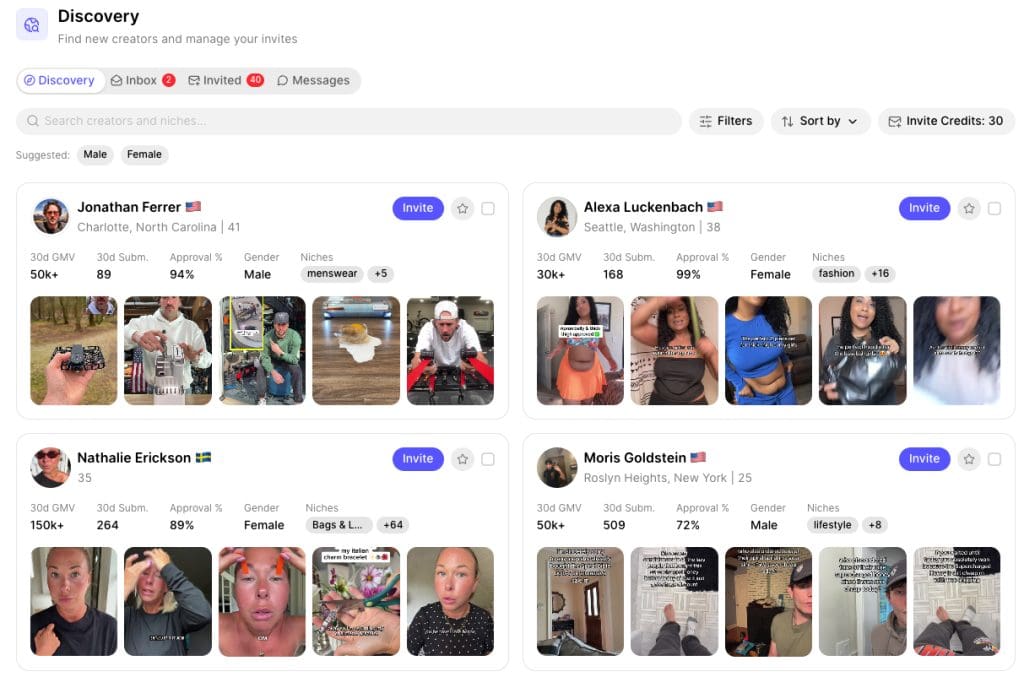
  • Recruiting: creators apply to your program, or you search Trybe’s creator directory and invite them directly. Each profile shows the creator’s sales driven in the last 30 days, submission volume, approval rate, and niches, so you can recruit proven performers instead of guessing. Direct invites use invite credits, so pick carefully.
  • Submissions: approve, revise, or reject videos in bulk, with AI tagging by angle, persona, and creative style.
  • Seeding: creators request product samples inside the app, synced to your Shopify catalog.
  • Communication: built-in chat with creators, so feedback doesn’t get lost across email and DMs.
  • Launching: push approved videos to Meta as whitelisted or Partnership Ads in a few clicks. NEW! Trybe also just rolled out Tiktok Ads Manager compatability and says YouTube is on the way next!
  • Attribution and payouts: server-side last-click attribution ties each sale to a creator, and Stripe-powered payouts run automatically.

Brands on the platform include Cuts Clothing, Cal AI, Wispr Flow, BYLT Basics, Sand Cloud, and Promix.

Why the model is smart

It flips the risk. Traditional UGC means paying a flat fee for every video before you know if any of them work. Trybe lets brands pay on performance instead: a percentage of attributed sales or ad spend, a flat fee, or a mix. Creators we’ve seen on the platform commonly earn 10% to 15% of GMV on content the brand runs. You pay most when a video is making you money.

It matches how Meta buys now. When creative is the targeting, the brand with 200 distinct concepts beats the brand with 20. Trybe’s model encourages creators to submit many takes, so you’re testing hooks, personas, and angles you’d never have briefed yourself.

It collapses the whitelisting bottleneck. Getting creator ad permissions is usually a chain of DMs and access requests. Here it’s built into the approval step, so a winning video can be live as a Partnership Ad the same day.

The platform fee is low. Trybe is free to start with no seats, contracts, or minimums, and its fee tops out at 1.5%. The full cost picture is in the next section.

The results brands report are big. Trybe’s own case studies show Final Boss Sour going from $300K to $2.1M a month in Meta-attributed revenue while CPA dropped from $35 to $20, and JiYu scaling DTC revenue from $50K to $2.5M a month in six months. Treat vendor case studies as best cases, not benchmarks. They still show what the ceiling looks like.

What Trybe actually costs a brand

Trybe’s platform fee is small, but it isn’t the whole bill. Here’s what a brand actually pays.

1. Trybe’s platform fee. One rate, based on how you pay creators, never stacked:

How you pay creators

Trybe’s fee

Commission on sales

1.5% of attributed sales

Commission on ad spend

1.25% of ad spend

Flat fees, retainers, or bonuses

1.5% of creator earnings

2. Creator pay. This is the biggest line item. Creators commonly earn 10% to 15% of the sales their content drives, and you set the rate.

3. Ad spend. Creator videos earn most of their money as paid ads, so budget to run and scale the winners.

4. Product. Free samples shipped to every creator you accept.

5. Team time. Someone has to review submissions, give feedback, check compliance, and launch ads. At hundreds of videos a month, that’s a real workload.

A simple example: creator ads drive $50,000 in sales at a 10% commission. The brand pays $5,000 to creators and $750 to Trybe, plus the ad spend behind those sales and the cost of samples. The difference from traditional UGC is that you pay as results come in, not before.

Why the timing matters: holiday 2026 and 2027

For holiday, the window is now, and it’s short. A creator program needs time to ramp: recruiting creators, shipping samples, collecting submissions, and testing enough ads to find winners. If you want proven creative scaling into Black Friday and Cyber Monday, you need to launch in early October. Start in mid-November and you’re testing when you should be scaling.

Holiday demands more creative, not less. CPMs climb, audiences see more ads, and fatigue hits faster. Gift-angle, bundle, and offer-specific creative all need fresh variations. A performance-paid creator bench is the most cost-efficient way we know to refill the pipeline weekly without a production budget spike.

For 2027, it’s infrastructure. The brands that build a creator bench this quarter walk into January with hundreds of tested concepts, data on which angles and personas convert, and a roster of proven creators. That compounds. Brands that wait will be starting cold while their competitors are iterating on winners.

Where it breaks

Trybe is a tool, not a strategy. You still need a creative strategist guiding your creators and running and optimizing your ads, videos, statics and entire funnel strategy.  The same features that make it powerful create predictable failure modes:

  • Volume without direction. Creator reviews note that some brands seem to want lots of drafts and care less about quality or original ideas. Without sharp briefs and clear creative angles, you get 300 versions of the same mediocre video.
  • Approved but never run. Creators report brands approving videos and then sitting on them for months. That kills your reputation on the platform, and the best creators stop submitting.
  • Saturation on popular programs. Big brands attract thousands of creators. One creator noted Cuts Clothing had roughly 3,200 accepted creators and 7,300 submissions. Standing out as a brand requires responsive communication, fast approvals, and fair commissions.
  • Attribution is a choice, not a truth. Trybe’s server-side last-click model is useful, but it will disagree with Meta’s reporting. Decide up front which model you pay creators on, and stick to it.
  • Meta-first. The ad-launching workflow is built around Meta. If TikTok or YouTube is your main channel, plan for manual steps.

None of these are reasons to skip it. They’re reasons to run it with a system.

Supplement and regulated brands: scale the creative, not the risk

This is the part most Trybe coverage skips. When a brand runs a creator’s video as an ad, the brand owns every claim in it. For supplement, wellness, and CPG brands, that matters a lot. (It’s why we built our supplement marketing practice around compliance.)

Hundreds of creators improvising scripts will produce disease claims (“cured my anxiety”), unsubstantiated results (“lost 20 pounds in a month”), and missing endorsement disclosures. Each one is an FTC or FDA exposure the moment it’s whitelisted, and the brand is the one on the hook.

The fix is a compliance layer built into the workflow, before anything reaches Meta:

  • Briefs that spell out approved structure/function language and banned claim types.
  • A claims review on every submission before approval, not after launch.
  • Clear disclosure requirements for Partnership Ads and any organic cross-posting.
  • A “do not run” library so creators learn the boundaries fast.

Done right, compliance doesn’t slow a creator program down. It keeps your winning ads from getting pulled at the worst possible moment.

How Forge runs Trybe programs

Forge manages Trybe creator programs for DTC brands as part of our influencer marketing services, and our team includes active Trybe creators, so we see the platform from both sides. We handle the parts that decide whether a program works:

  1. Program design: commission structure, product selection, and creator recruiting criteria.
  2. Creative direction: briefs built from your best-performing angles, updated weekly from submission data.
  3. Compliance review: claims and disclosure checks on every submission, built on 10+ years of brand-side supplement experience.
  4. Media buying: launching, testing, and scaling winners in Meta alongside your existing account structure.
  5. Creator management: fast approvals and responsive communication, so top creators keep choosing your program.

If you want proven creator ads running by Black Friday, the time to start is this month.

Start your Trybe program here, or book a call with Forge and we’ll build it with you.

Disclosure: Forge Digital Marketing is a Trybe agency partner, and the link above is our referral link. We may earn a commission or credit if you sign up through it. Trybe is free to join either way.

Sources

0

Advertising, Meta Ads

TL;DR: You can profitably advertise supplements on Meta in 2026 if you:

For a real-world example, see how we drove a 3.6x ROAS on Meta for a skincare brand.

  • avoid explicit or implied disease claims

  • use structure–function language (“supports,” “helps maintain”)

  • keep creatives lifestyle‑ and product‑focused

  • align landing pages with compliant copy

  • lean into Andromeda‑powered Advantage+ structures

  • and use Manus AI inside Ads Manager to diagnose issues and scale what’s working.

By Erin Siemek, CEO of Forge Digital Marketing Last updated: March 2026

If you’ve tried to advertise supplements on Meta (Facebook, Instagram, WhatsApp), you’ve probably experienced the same headache: ads get disapproved, appeals go nowhere, and your acquisition pipeline stalls while you scramble to figure out what went wrong. Meta’s policies for health and wellness are stricter than ever, and 2025–2026 AI changes (like Andromeda and Manus AI) have made the system less forgiving if you stray outside the lines.

This guide breaks down how Meta actually treats supplement ads today, the specific claims and creative patterns that trigger rejections, how to structure compliant copy and landing pages, and how to optimize campaigns using modern best practices—including Andromeda‑driven Advantage+ campaigns and the new Manus AI assistant inside Ads Manager.

Why Meta Keeps Rejecting Supplement Ads (The Policy Overview)

Meta doesn’t have a blanket ban on supplements, but many supplement products fall into restricted Health and Wellness and Drugs & Supplements categories, which get far more scrutiny than general ecommerce. Meta faces regulatory and reputational risk if it allows unapproved or misleading health claims, so it enforces strict rules and expects advertisers to align with FTC and local health regulations—not just platform policy.

Three big forces drive rejections for supplement ads:

  • Regulatory risk and unapproved health claims Meta’s Health and Wellness policies prohibit ads that claim to cure, treat, or prevent diseases or serious medical conditions, especially when the product is not an approved drug.

  • Sensitive personal attributes and health conditions Meta’s Personal Attributes rules prevent you from stating or implying that you know someone has a specific condition (for example, “Sick of your anxiety attacks?”), or from targeting based on sensitive health traits.

  • Misleading results and transformations The platform has tightened enforcement on exaggerated claims, dramatic before‑and‑after imagery, weight‑loss promises, and strong expert endorsements, all of which it views as high‑risk for vulnerable users.

Meta isn’t trying to make life impossible for legitimate brands; it’s trying to filter out bad actors without reviewing every single ad by hand. In practice, that means supplement advertisers have to work with automated systems that default to “no” unless your copy and creative are clearly safe.

Meta’s Specific Rules for Health and Supplement Ads

To stay out of trouble, you need to understand where Meta draws the line on claims, creative, and targeting.

1. Avoid explicit and implied disease claims

Meta’s unapproved health claims policies are fundamentally about stopping disease‑level promises from unregulated products.

You should avoid language (and imagery) that says or strongly implies your supplement:

“Cures,” “treats,” “prevents,” “heals,” “reverses,” or “eliminates” a disease or diagnosable condition.

  • “Reduces the risk of” or “protects against” named diseases (for example, heart disease, diabetes, cancer, depression, arthritis).

  • Directly addresses users as if they have a diagnosis: “If you suffer from chronic anxiety, this is for you.”


Even softer phrases like “fight off illness,” “stop getting sick,” or “finally get relief from your back pain” can be interpreted as disease claims and trigger disapprovals.


2. Use structure–function style claims (carefully)

You’re safer when you stick to structure–function style language—claims about supporting normal body function—rather than implying medical treatment.

Safer patterns include:

  • “Supports immune function.”

  • “Helps maintain healthy cholesterol levels.”

  • “Supports joint comfort and mobility.”

  • “Helps maintain a calm and relaxed mood.”

However, “safer” doesn’t mean guaranteed. Meta can still reject copy if it feels like disease prevention or over‑promises results, especially around immunity, mental health, and weight.


3. Claims must be truthful and substantiated

Meta’s general ad standards require that all claims be truthful, not misleading, and supported by evidence. For supplements, this means:

  • Don’t use precise improvement numbers (“Increase strength by 30%”) unless you’re prepared with clinical proof.

  • Avoid sweeping transformations (“life‑changing results,” “total body reset”) when they could be read as health outcomes rather than lifestyle aspiration.

You can still speak aspirationally, but keep the claim grounded:

Safer: “Designed to support endurance and power.”

  • Risky: “Guaranteed 20% strength increase in 30 days.”


4. Be careful with experts and endorsements

Meta does not have a single, explicit line that says “no doctor endorsements for supplements,” but in practice, ads that feature professionals personally recommending a product for a specific health outcome are frequently rejected.


High‑risk examples:

  • “I’m a physician, and I recommend this supplement to my patients with anxiety.”

  • “I’m a registered dietitian and this is my #1 recommendation for weight loss.”


Lower‑risk alternatives:

  • Educational content from a professional explaining general ingredient benefits, without personal use or specific health outcomes.

  • Brand‑level credibility markers on your site (ad copy keeps the expert out of explicit recommendation territory).


5. Transformation and body imagery rules

Meta is highly sensitive to appearance‑ and weight‑related content.

Avoid:

  • Dramatic before‑and‑after images for weight loss, muscle gain, or skin conditions.

  • Zoomed‑in “problem area” shots that could be read as body shaming (for example, close‑ups of bellies or acne).

  • Visuals that clearly imply a medical transformation (for example, severe joint damage vs. normal joint).

Lean on:

  • Lifestyle imagery: people moving, cooking, working, and living—where the product is part of a healthy routine, not a magic fix.

  • Clean product shots: bottle, packaging, simple benefit callouts that pass policy muster.


6. Targeting and age restrictions

Meta’s policies on Personal Attributes and Health and Wellness significantly limit how you target and speak to users.

Key principles:

Don’t build or speak to audiences based on implied conditions (“people with anxiety,” “people trying to fix their gut issues”).

Don’t phrase copy as if you know someone’s health status (“Tired of your chronic insomnia?”).

Expect under‑18 targeting restrictions for weight‑loss, cosmetic, and many supplement categories, and stricter age rules (often 21+) for alcohol and certain regulated substances; check Meta’s latest age‑gating rules for your category.

Broad, behaviour‑based targeting plus Meta’s AI is now the norm; manual micro‑targeting on sensitive health interests is both less effective and more dangerous policy‑wise.


The Most Common Reasons Supplement Ads Get Disapproved (With Examples)


Below are typical disapproval triggers, with safer rewrites that stay inside Meta’s current guardrails.


Example 1: Health claim crosses into disease territory

  • Rejected copy: “Our turmeric supplement reduces inflammation and joint pain.”

  • Why: “Reduces inflammation and joint pain” sounds like treating a medical condition (for example, arthritis), not supporting normal function.

  • Safer alternative: “Our turmeric formula supports healthy joint comfort and mobility.”


Example 2: Implied health claims through visuals

Rejected ad: Before‑and‑after photos showing dramatic weight loss with text “Try our weight loss supplement.”

Why: The imagery and copy together promise a specific transformation and treat weight loss as a health outcome, which Meta flags as high‑risk.

  • Safer alternative: Lifestyle imagery of people being active, paired with copy like “Supports metabolism and healthy energy levels”—no numerical loss claims, no transformation visuals.


Example 3: Health professional testimonial

  • Rejected ad: “I’m a registered dietitian, and I recommend this supplement to my clients for better sleep,” with credentials visible.

  • Why: Combines professional authority with a specific health outcome, which often triggers rejection.

  • Safer alternative: “Formulated with magnesium to support relaxation and quality rest,” with no expert endorsement in the ad itself.


Example 4: Vague disease‑prevention language

  • Rejected copy: “Boost your immune system. Fight off illness with our premium multivitamin.”

  • Why: “Fight off illness” implies disease prevention, not just support of normal function.

  • Safer alternative: “Support your immune system with our premium multivitamin.”


Example 5: Unsupported performance promises

  • Rejected copy: “Increase your athletic performance by 30% with our pre‑workout supplement.”

  • Why: Specific numeric improvement requires strong evidence and can still be treated as misleading.

  • Safer alternative: “Support your athletic performance with our pre‑workout formula, designed for endurance and power.”


How to Write Compliant Supplement Ad Copy (Do’s and Don’ts)

Think of your copy as a conversation with both your ideal customer and Meta’s policy engine at the same time.


Do: Use safe, structure–function phrasing


  • Use verbs like “supports,” “helps maintain,” “helps promote,” “helps you feel.”

  • Tie benefits to normal body function: “supports immune health,” “helps maintain normal cholesterol levels,” “supports calm and focus.”

  • Keep timelines and promises modest; hint at support, not guaranteed outcomes.


Do: Focus on ingredients and education

  • Highlight what’s inside and why: “Contains vitamin C to support immune function,” “Formulated with ashwagandha, traditionally used to support stress resilience.”

  • Use simple infographics or carousels to explain ingredient roles without implying medical treatment.


Do: Emphasize lifestyle and wellness

  • Frame your supplement as part of a healthy lifestyle: “Build a daily wellness ritual,” “Support your training routine,” “Fuel your active days.”

  • Make the user the hero, and your product a tool—not a miracle cure.


Do: Use required legal disclaimers

  • For US dietary supplements, include: “These statements have not been evaluated by the Food and Drug Administration. This product is not intended to diagnose, treat, cure, or prevent any disease.”

  • Keep this language clearly visible on the landing page, not buried in fine print.


Do: Highlight third‑party trust signals

  • Show NSF, GMP, organic, or third‑party testing badges where applicable.

  • These build credibility without making health claims and are generally safe from a policy standpoint.


Don’t: Use disease or desperation language

Avoid verbs like “cures,” “treats,” “prevents,” “heals,” “reverses,” “eliminates,” “controls,” or “manages” in a health context.

  • Skip desperation‑based hooks like “Finally, relief from…” or “Suffering from…?” that imply diagnosis or exploit vulnerable users.


Don’t: Make guaranteed or quantified promises without proof

  • Avoid “guaranteed” results, “clinically proven” without actual clinical data, or specific percentage improvements.

  • If you do have research, mirror the conservative framing used in the study and be prepared for extra scrutiny.


Don’t: Lean on expert endorsements

  • Don’t use “doctor‑recommended” or show doctors and dietitians endorsing specific outcomes in your ad creative or primary text.

  • Keep expert credibility on your site (about pages, articles) and let ads focus on compliant product benefits.


Don’t: Use dramatic transformations or weight‑loss imagery

  • Avoid before‑and‑after photos, extreme physique changes, and visuals centered on “problem” body parts.

  • Use movement, energy, and lifestyle shots instead.


Creative and Imagery Guidelines That Pass Meta Review

Meta’s automated systems review the image or video as aggressively as the text, so your creative must be policy‑safe even on mute.


Lifestyle imagery

  • Show real people using your product in natural settings: working out, cooking, working at a desk, hiking, playing with kids.

  • Avoid expressions of pain, distress, or visible “suffering” that could tie back to medical conditions.


Product‑centric imagery

Use clean product shots—bottle, jar, sachets—with neutral backgrounds and short, compliant benefit phrases.

  • Don’t print disease claims or dramatic promises directly on labels or overlays; reviewers see those as part of the ad.


Educational graphics

  • Infographics that explain how ingredients support body functions (for example, “Vitamin D: supports bone health”) tend to perform well and pass review.

  • Keep charts and diagrams simple and avoid medical imagery like scans, x‑rays, or symptoms photography.


Testimonials (with caution)

  • Customer testimonials focusing on experience (“I feel more energized,” “I stay focused longer at work”) are safer than claims framed as medical outcomes.

  • Avoid reviews that mention diagnoses or cures (“This cured my anxiety,” “My arthritis is gone”).


Landing Page Requirements for Supplement Ads

Meta doesn’t stop at your ad; it checks the landing page for consistency and policy compliance. If your page makes stronger health claims than your ads, expect disapprovals.


Align messaging from ad to page

  • Match your landing page language to the tone and claims of your ad: if the ad says “supports energy,” the page shouldn’t say “eliminates fatigue forever.”

  • Keep structure–function framing consistent across headlines, bullets, and FAQs.


Include legally required disclaimers and transparency

  • Display the FDA disclaimer prominently for US dietary supplements.

  • Provide clear supplement facts, ingredient lists, serving sizes, and usage instructions; transparency helps reviewers and builds consumer trust.


Avoid medical positioning and disease content

  • Don’t include disease‑oriented blog posts, graphs, or claims on the same product page (for example, “Our supplement prevents heart disease”).

  • Keep disease education, if you choose to publish it, in separate educational content that is not used as a destination for ads.


Use social proof responsibly

  • Include customer reviews that describe experiences, preferences, and lifestyle benefits, not diagnoses and cures.

  • Avoid star‑rating widgets that specifically rate medical outcomes (“Pain relief: 5/5”) next to the primary product pitch.


What to Do When Your Ad Gets Rejected (Appeal Process)

Even with best practices, some supplement ads will get flagged by Meta’s automated systems. Here’s how to handle disapprovals efficiently.


  1. Read the disapproval reason Look at which policy bucket got triggered: “Unapproved health claims,” “Misleading or false content,” “Health or personal attributes,” etc.
  2. Audit your ad and landing page
  3. Check for disease language, implied diagnoses, dramatic transformations, expert endorsements, or misaligned claims between ad and page.
  4. Edit and resubmit
  5. Make targeted changes: soften verbs (“supports” instead of “fixes”), swap imagery, or remove expert references.
  6. Resubmit once you’ve made meaningful adjustments; don’t spam the same creative hoping to randomly get approved.


  1. Request manual review with an explanation
  2. Use the “Request Review” / appeal option and briefly explain how your ad complies: “This ad makes only structure–function claims and does not reference diseases or conditions.” “Our landing page includes the FDA disclaimer and no disease claims.”
  3. Escalate to account review if patterns persist
  4. If multiple compliant ads keep getting rejected, request a broader account review and consider simplifying your structure so Andromeda can re‑evaluate your setup.


Alternative Growth Channels When Meta Is Too Restrictive

Some supplement categories—especially weight‑loss, anxiety, and other sensitive health topics—will always be tough on Meta. When you hit that wall, diversify.

  • Google Shopping and Search – Often more tolerant of supplement listings, especially for brand and ingredient terms; great for capturing clear intent.

  • TikTok Ads – Still more flexible on supplement creative (though tightening); short‑form UGC‑style videos and education‑first content work well.

  • YouTube Ads – Excellent for long‑form education (for example, explaining formulations, ingredient sourcing, and rituals).

  • Organic social – Content series, ingredient breakdowns, and community building on Instagram, TikTok, and YouTube that don’t rely on ad approval.

  • Email and SMS – Turn visitors into owned audiences with content‑driven lead magnets, then educate and convert without platform policy constraints.

  • Influencer partnerships – Let creators integrate your product into their content within each platform’s rules, expanding reach even when your own ad account is constrained.
    Tiktok Affiliates – Get on Tiktok Shop and leverage “the social snowball effect” of an affiliate “swarm” – if you need a good example of how effective that can be, check out the brand Comfrt on TT.


How to Optimize Supplement Ads on Meta in 2026 (Andromeda, Advantage+, Manus AI)

Meta’s ad ecosystem changed dramatically with its Andromeda AI engine and the rollout of GEM and Advantage+ enhancements in 2025. In early 2026, Meta integrated Manus AI directly into Ads Manager, giving advertisers an embedded assistant to analyze accounts and propose optimizations. To make supplement ads work now, you need to design around these systems rather than fighting them.


1. Simplify account structure and go broad (within policy)

  • Use Advantage+ Shopping / Sales campaigns as your main acquisition levers instead of dozens of small, segmented ad sets.

  • Consolidate into a handful of campaigns by objective and funnel stage (for example, Prospecting, Retargeting, Win‑Back), giving Andromeda enough volume to learn.

  • Start with broad targeting constrained only by geography, age (respecting health‑category age rules), and legal limitations; let AI optimize whom to show your ads to.


2. Feed Andromeda diverse, compliant creative

Andromeda rewards campaigns that give it multiple creative angles to test within a stable structure.


Include, at minimum:

  • Ingredient‑education ads (highlighting a key ingredient and its structure–function benefit).

  • Lifestyle ads (people using the product in daily life).

  • Social‑proof ads (testimonials framed as experiences, not cures).

  • Offer‑driven ads (bundles, subscription discounts, or trials) with compliant language.

Use Reels and short vertical video as core formats; Meta is heavily favoring these, and supplement brands see strong CPAs when they pair UGC hooks with compliant claims.


3. Optimize for high‑quality purchase signals

Andromeda’s decisions are only as good as the signals it sees.

  • Optimize your primary campaigns for purchase (or subscription) events, not just clicks or views.

  • Tighten your pixel + Conversions API setup so events are deduplicated, firing correctly, and mapped to the right standard events (for example, ViewContent, AddToCart, Purchase).

  • Use value‑based optimization where AOV justifies it—higher conversion values give Andromeda better feedback on which audiences and creatives drive profitable orders.


4. Use Manus AI inside Ads Manager to troubleshoot and scale

With Meta’s acquisition and integration of Manus AI, you now have a native assistant that understands your account data in real time.

For supplement brands, Manus AI can:

Run account health audits to spotlight patterns: which campaigns are learning‑limited, which creatives frequently trigger disapprovals, and where CPAs are drifting.

Group campaigns by funnel stage and recommend consolidation or budget reallocation based on performance under Andromeda.

Surface creative insights—for example, that your ingredient‑education ads are driving most purchases, while certain testimonial formats underperform or cause policy flags.

Use Manus AI as your first stop before a rebuild: ask it what’s working, what’s not, and where policy issues cluster, then make surgical changes instead of starting from scratch.


5. Lean into Meta’s AI creative tools with guardrails

Meta’s AI tools can generate headlines, text variations, and visual tweaks, but they don’t inherently understand supplement regulations.

Best practice:

  • Use AI suggestions for formatting and angle variety, not for core claims language.

  • Lock guardrails in your briefs: clearly specify no disease terms, no guarantees, no expert endorsements, and no before‑and‑after metaphors.

  • Have a human (or your internal compliance checklist) review every AI‑generated variant before it goes live.


6. Measure incrementality, not just in‑platform ROAS

With so much automation, it’s easy to over‑ or under‑credit Meta for supplement performance.

  • Pair Ads Manager reporting with blended CAC and LTV from your ecommerce platform to see the full picture.

  • Run periodic geo‑based or audience hold‑out tests to estimate incremental lift from Meta versus baseline performance driven by search, organic, email, and influencers.

  • For subscription and replenishment‑heavy supplements, track the impact of Meta‑sourced cohorts on long‑term retention, not just first‑order ROAS.


How Forge Navigates Meta Compliance for Supplement Brands

At Forge, we’ve built a compliance‑first Meta playbook specifically for supplement brands living under Andromeda and Manus AI. We focus on minimizing rejections and maximizing profitable scale.


Our process:

  1. Claims and positioning audit – We review your product, labels, and website to identify disease‑adjacent language, risky testimonials, and compliance gaps.

  2. Ad copy and creative rewrite – We rebuild your messaging using structure–function framing, safe emotional hooks, and policy‑friendly visuals.

  3. Landing page alignment – We align product pages with compliant claims, add legally required disclaimers, and ensure there are no hidden disease claims that could trigger disapprovals.

  4. Andromeda‑native account structure – We consolidate campaigns into Advantage+‑driven setups optimized for purchase signals and high‑performing creative angles.

  5. Ongoing monitoring and appeals – We use Manus AI and manual reviews to quickly address disapprovals, adjust creative, and keep your account in good standing.

  6. Channel diversification plan – We help you layer in Google, TikTok, YouTube, email, and influencers so your growth isn’t dependent on Meta alone.


Instead of guessing what Meta will approve, we treat policy and AI systems as fixed constraints and build a creative and performance engine that works within them. If your supplement brand is stuck in disapproval hell, the problem is usually structure and messaging, not the product itself.

0

This quick and easy guide will teach you as a new client at Forge, how to:
  1. Create a Meta Business Portfolio

  2. Create an Ad Account inside it

  3. Add a payment method

  4. Confirm ownership

  • How to Set Up Your Meta Business Manager & Ad Account

    (For first-time Meta advertisers)

    If you’re new to Meta advertising, your business will need two things before ads can run:

    1. A Meta Business Manager (Business Portfolio)

    2. A Meta Ad Account created inside that portfolio

    Meta requires these to be created and owned by the business — agencies cannot create or own them on your behalf. The good news: setup is straightforward, and this guide walks you through it step by step.

    💡 If you already have a Business Manager or Ad Account, you can skip this guide.

    What you’ll need before starting

    • A personal Facebook profile (used only to log in — not for posting)

    • A business email address

    • Your business name

    • 5–10 minutes of time

    Step 1: Create your Meta Business Manager

    Your Meta Business Manager is the central hub for all your Facebook and Instagram business assets — including pages, ad accounts, pixels, and access permissions.

    How to create it

    1. Go to https://business.facebook.com/overview

    2. Click Create account

    3. Enter:

      • Your business name

      • Your name

      • Your business email address

    4. Follow the on-screen steps to complete setup

    5. Confirm your email address if prompted

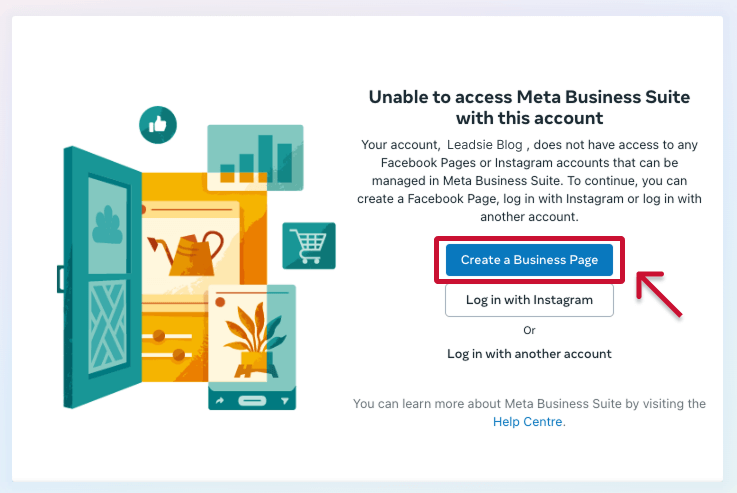
    Unable to access Meta Business Suite with this account

    Once complete, your Business Manager is live and ready to add assets.

    Step 2: Add (or create) your Facebook Page

    If you already have a Facebook Page for your brand, you’ll add it to your Business Manager.

    1. Open Business Settings

    2. Go to Accounts → Pages

    3. Click Add

    4. Choose Add a Page and enter your Page name or URL

    If you don’t have a Page yet, you can create one here instead.

    Business Settings → Pages → Add Page

    Step 3: Connect your Instagram account

    Connecting Instagram allows your ads to run across both Facebook and Instagram.

    1. In Business Settings, go to Accounts → Instagram accounts

    2. Click Add

    3. Log in to your Instagram Business account

    4. Approve the connection


    Step 4: Create your Meta Ad Account

    Your Ad Account is where campaigns live and where ad spend is billed.

    How to create it

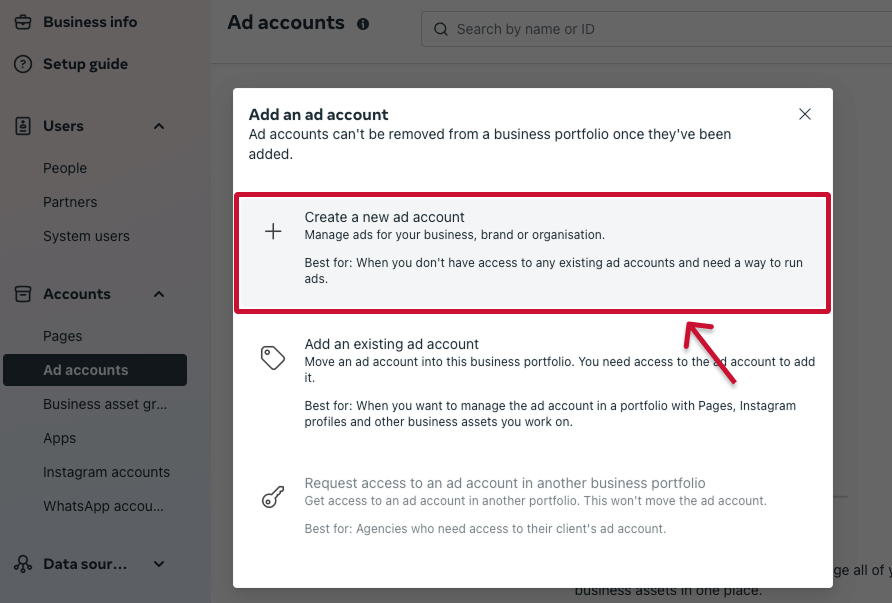
    1. Go to Business Settings → Accounts → Ad accounts

    2. Click Add

    3. Select Create a new ad account

    4. Enter:

      • Ad account name (example: Your Brand – Main Ad Account)

      • Time zone

      • Currency

    5. Click Create ad account

    6. Add a valid payment method when prompted

    How to create a new Facebook or Meta Ad account

    ⚠️ Important: Once an ad account is created, it cannot be deleted — only closed. Please double-check the name, time zone, and currency before confirming.

    Step 5: Add additional assets later

    You don’t need to do this now — Forge will help guide or audit these during onboarding if needed.

    Optional assets include:

    • Meta Pixel

    • Product Catalog (for eCommerce)

    • Conversion events

    What happens next?

    Once your Business Manager and Ad Account are created:

    1. Complete Forge’s Meta Ads onboarding

    2. You’ll receive a secure access request via Leadsie

    3. Leadsie will guide you through approving access step by step

    4. Forge will review everything and prepare your account for launch

    👉  What to expect when approving Meta access via Leadsie


    Important notes & best practices

    • Always use a business email address when setting up Meta assets

    • Your business should own the Business Manager and Ad Account

    • Agencies (like Forge) manage access — ownership stays with you

    • If you get stuck at any point, our team is happy to help


    You’re not behind

    Many successful brands start Meta ads without having any of this set up. This guide exists to make the process smooth, simple, and stress-free — and we’ll support you every step of the way.

0

Your Meta Business ID (also called a Business Portfolio ID or Partner ID) is a unique 16-digit number that identifies your business inside Meta. We use this ID to securely request access to your accounts without needing your login information.

Steps to find your Meta Business ID

  1. Log into Meta Business Suite

  2. Click Settings

  3. Select Business portfolio info from the left-hand menu

  4. Copy the Business ID shown under your business name

That’s it — you can now share this ID with our team.
How to find Meta business ID-Click on Business portfolio info
How to find Meta business ID

Important notes

  • Your Meta Business ID is not the same as your Facebook Page ID or Ad Account ID

  • Sharing your Business ID does not grant access on its own — it simply allows us to send a secure access request through Meta

If you run into any issues locating your Business ID, our team is happy to help.

0

Skip to content